
Mapping Schema Properties in Schema Package
This guide explains how to map Schema.org properties in the Schema Package plugin, allowing you to dynamically connect schema fields with WordPress content, custom fields, and structured data sources.
By mapping schema properties, you ensure your structured data stays accurate, scalable, automated, and SEO‑friendly across your website.
📌 What Is Schema Property Mapping?
Schema Property Mapping lets you assign Schema.org properties (such as name, image, author, price, review, etc.) to:
- WordPress default fields (Title, Content, Featured Image, Excerpt)
- Custom Fields (ACF, SCF, Custom Fields, Meta Fields)
- Static/manual values
- Dynamic content sources
This avoids manual schema entry on every post and keeps your markup consistent and future‑proof.
🎯 Why Use Property Mapping?
- Automate schema generation across posts and pages
- Reduce repetitive data entry
- Maintain accurate structured data at scale
- Improve SEO and eligibility for rich results
- Support dynamic content updates
🧭 Where to Find Schema Property Mapping
You can access Schema Property Mapping from:
- Schema Package Dashboard → Edit a Schema Type
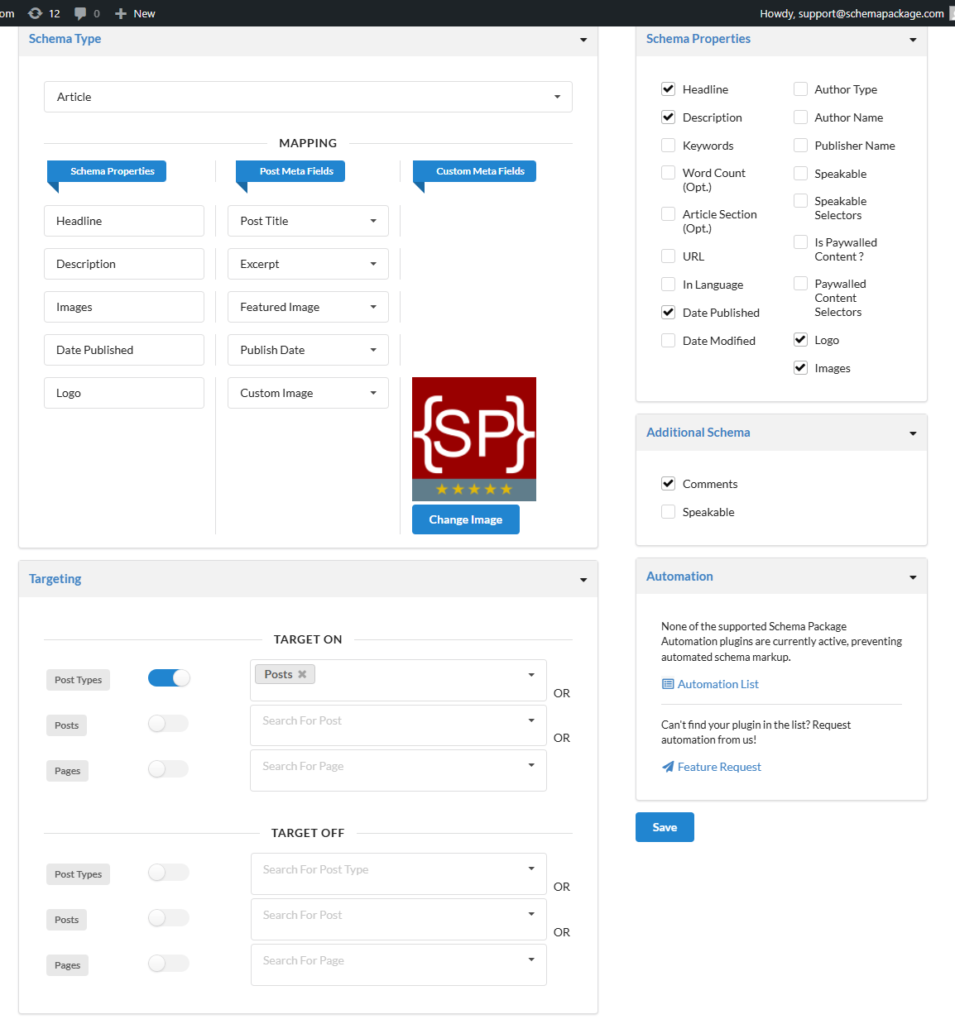
🏗 How the Mapping Interface Works
The mapping interface is typically divided into three columns:
Column 1 — Schema Properties
This lists Schema.org properties such as:
namedescriptionimageauthordatePublishedpricereview
Column 2 — Data Source Selection
Choose where the data should come from:
- Post Title
- Post Content
- Featured Image
- Excerpt
- Custom Fields (ACF / SCF, Custom Fields / Meta)
- Manual / Static Value
Column 3 — Field Mapping / Value Selector
Based on your selected source, you can:
- Select a specific custom field
- Enter a static value
- Dynamically link another property
🔄 Example: Mapping Basic Properties
Example: Article Schema
| Schema Property | Data Source | Value / Field |
|---|---|---|
headline | Post Title | |
description | Excerpt | |
image | Featured Image | |
author | Custom Field | author_name |
⚙️ Mapping Static vs Dynamic Values
Static Values
Use when the value does not change across posts.
Example:
- Organization Name
- Default Publisher
Dynamic Values
Use when the value changes per post.
Example:
- Product Price
- Review Rating
🛠 Best Practices for Schema Property Mapping
✅ Map properties to dynamic fields whenever possible
✅ Avoid duplicate schema across multiple sources
✅ Follow Schema.org recommended properties
✅ Test schema using Rich Results & Structured Data validators
✅ Keep mappings consistent across post types
🚨 Common Mistakes to Avoid
❌ Leaving required schema properties unmapped
❌ Mixing static and dynamic data incorrectly
❌ Creating conflicting schema types on the same page
❌ Using incorrect property formats (e.g., text instead of URL)
🔍 Testing Your Mapped Schema
After mapping properties, always test your structured data using:
❓ FAQ
Does mapping work with dynamic custom fields?
Yes. ACF, SCF, Custom Fields, and Meta Fields are fully supported.
Will mapped schema update automatically?
Yes. Updates occur automatically when post data changes.
🎉 Conclusion
Schema Property Mapping in Schema Package gives you full control, automation, and scalability over your structured data strategy.
By mapping schema properties correctly, you ensure your website remains SEO‑optimized, eligible for rich results, and future‑ready.