
Mapping Schema Properties with Secure Custom Fields (SCF) in Schema Package
This guide explains how to map schema.org properties with Secure Custom Fields (SCF) using the Schema Package plugin. By connecting SCF fields to schema properties, you can dynamically generate accurate, structured data based on your post, page, or custom post type content without manually entering schema values each time.
What Is SCF Mapping in Schema Package?
SCF Mapping allows you to:
- Automatically populate schema properties from SCF field values
- Keep schema markup in sync with your content
- Avoid hard-coding schema values
Schema Package reads SCF field data at runtime and injects it into the selected Schema.org properties in JSON-LD format.
Supported Requirements
Before starting, make sure the following are in place:
- Schema Package plugin installed and activated
- Secure Custom Fields (SCF) plugin installed and activated
- SCF fields already created and assigned to posts, pages, or custom post types
- At least one schema type added via the Schema Package Dashboard (Global Setup).
How Schema Package Detects SCF Fields
Schema Package automatically:
- Detects all registered SCF fields
- Groups them by field group and post type context
- Identifies the SCF field type (text, textarea, image, URL, number, etc.)
- Adjusts schema property options based on the selected SCF field type
This ensures correct data formatting and compatibility with Schema.org standards.
Note: Mapping works seamlessly for all basic SCF field types. However, in some advanced or custom SCF setups, additional adjustments may be required. These enhancements are available in the Premium version of Schema Package. Please upgrade to Premium and contact our support team. we’ll take care of the mapping for you.
Steps: Mapping Schema Properties with SCF
Follow the steps below to map schema properties with SCF fields.
Step 1 — Configure schema markup global setup using reference documentation : Go to
Step 2 — Checked the properties which need to be mapped from Schema Properties right side top metabox.
Mapping section will be added just below selected schema type with three main columns:
- Schema Properties
- Data Source / Value Selector
- Fields / Value Selector
Step 3 — Choose “Secure Custom Field” as the Data Source in 2nd column from dropdown
Step 4 — Select/Search for the SCF Field as Value Selector in 3rd column from dropdown
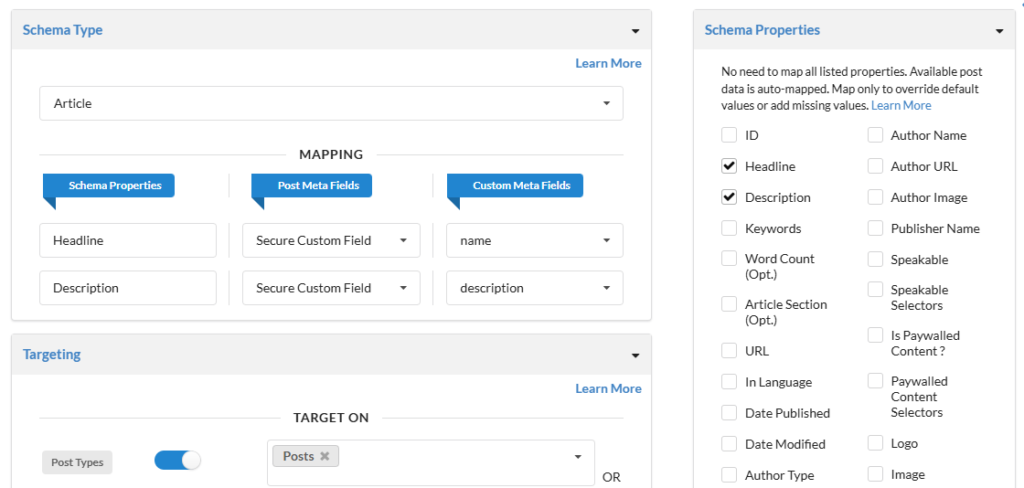
Step 5 — Automatic Type Handling
Schema Package automatically adapts mapping based on the selected SCF field type:
- Text / Textarea → Used directly as schema text values
- Image → Image URL or ImageObject (based on schema requirements)
- URL → Used for URL-based properties
- Number → Used for numeric schema properties (price, rating, etc.)
- Repeater / Group → Supported where schema allows multiple values
Step 6 — Preview and Save the Schema
- Review all mapped properties
- Click Save Schema
- Schema Package will now dynamically pull SCF values when rendering schema on the frontend
- Use clear and consistent SCF field names
- Match SCF field types with appropriate schema properties
- Avoid mapping empty SCF fields (ensure data exists)
- Test schema output using Google Rich Results Test or Schema Validator
Common Issues & Troubleshooting
SCF fields not showing?
- Ensure SCF plugin is active
- Check field group location rules
- Verify the schema is applied to the same post type
Final Notes
Mapping Schema Properties with SCF in Schema Package provides a powerful, flexible, and scalable way to generate structured data automatically from your existing content.
This approach is highly recommended for advanced WordPress setups, custom post types, and SEO-focused websites that rely heavily on SCF for content management.
If you face any difficulties while setting up SCF mapping, feel free to contact the Schema Package support team—we’ll be happy to help.