
How to Add Social Profile Links (sameAs) in Schema Markup Using Schema Package
Adding social profile links to your schema markup helps search engines clearly understand your brand’s online presence. By using the sameAs property, you can link your website to official profiles like Facebook, Twitter (X), LinkedIn, Instagram, and more.
With Schema Package, you can easily add these links without writing any code.
What is the sameAs Property?
The sameAs property in Schema.org is used to indicate that a webpage or entity is the same as another URL across the web.
Example:
"sameAs": [
  "https://www.facebook.com/yourpage",
  "https://twitter.com/yourhandle",
  "https://www.linkedin.com/company/yourcompany"
]
This tells search engines that all these profiles belong to the same entity (your business, brand, or person).
Why Use Social Profile Links in Schema?
Adding sameAs links provides several SEO and branding benefits:
- Improves entity recognition in search engines
- Helps build trust and authenticity
- Increases chances of knowledge panel enhancements
- Connects your brand across multiple platforms
Method 1: Using Schema Package Dashboard (Global Setup)
This method is best for global implementation across your website.
Steps:
- Go to Schema Package Dashboard
- Click on Add New Schema
- Choose a schema type which support sameAs property such as:
- Organization
- Person
- Local Business
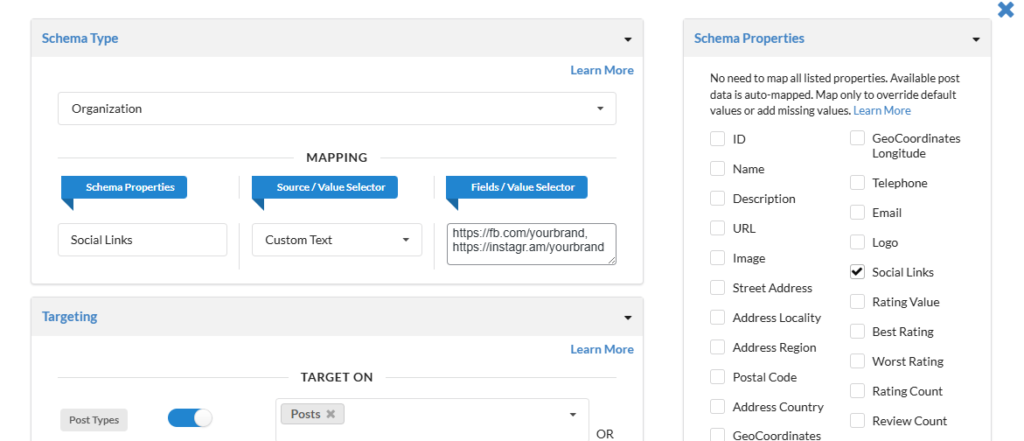
- Schema Properties metabox in sidebar checked Social Links
- Map the checked sameAs property
- If you select Custom Text from the value selector, enter the URLs as a comma-separated list.
- Configure placement:
- Global
- Specific Post Types
- Specific Pages
- Click Save
Method 2: Using Schema Package Generator (Manual Control)
This method is ideal when you want page-specific schema customization.
Steps:
- Open any post or page editor.
- Configure the schema using the second method described in this documentation.
- Select a schema type that supports the sameAs property.
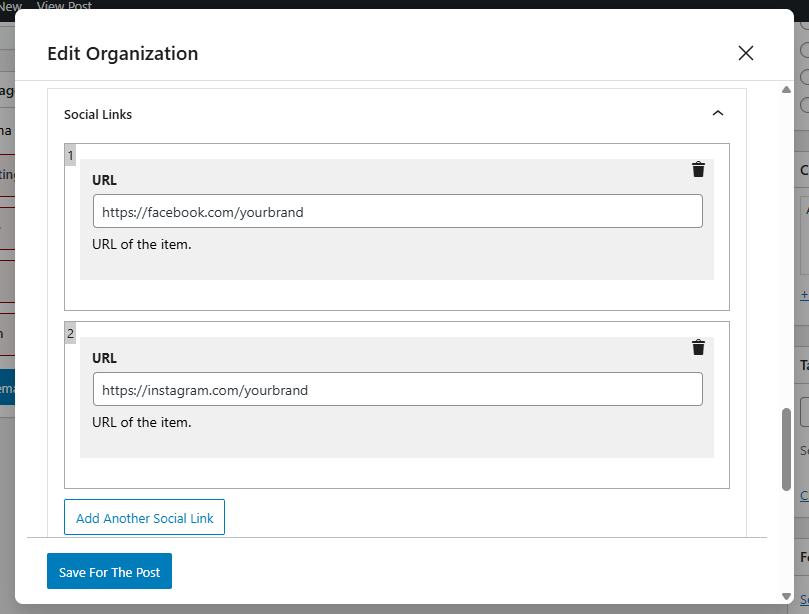
- In the edit popup, locate the Social Links repeater field.
- Add all your social profile links there.
Best Practices for sameAs Links
To get the most out of your schema:
- ✅ Use only official and active profiles
- ✅ Ensure URLs are publicly accessible
- ✅ Keep naming consistent across platforms
- ✅ Avoid adding duplicate or irrelevant links
- ✅ Prefer major platforms:
- Twitter (X)
- YouTube
How to Test Your sameAs Schema
After adding your schema, always validate it using:
Simply paste your page URL and check if the sameAs property appears correctly.