
Help Center
How to Completely Remove Unwanted Schema Properties from JSON-LD in Schema Package
When working with structured data in Schema Package, you may come across situations where certain properties are automatically added to your schema output, but you don’t actually need them.
Instead of leaving these fields empty or incorrect, Schema Package gives you a clean way to completely remove any property (both key and value) from the final JSON-LD.
✅ The Smart Way: Use “No Value” Mapping
Schema Package includes a special mapping option:
Source = No Value
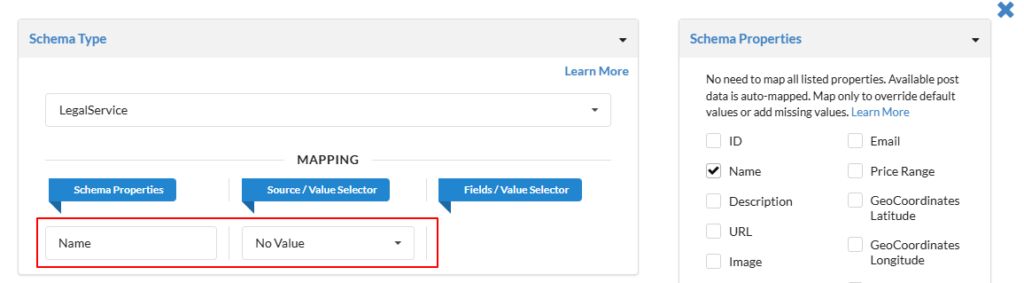
When you assign this to any property, it ensures:
- 🚫 The property is not included at all
- 🚫 No empty or null values are printed
- 🚫 No leftover keys remain in JSON-LD
- ✅ Clean and optimized schema output
🔍 Why This Matters
By default, Schema Package intelligently pulls data from:
- WordPress core fields (title, author, dates)
- Featured images
- Custom fields (ACF, etc.)
- Other mapped sources
But sometimes:
- The data is not relevant
- The value is incorrect
- The property is not required for your schema type
In such cases, removing the property is the best approach.
📌 Practical Example
Default Schema Output
{
  "@type": "Product",
  "name": "Sample Product",
  "image": "https://example.com/image.jpg",
  "brand": {
    "@type": "Brand",
    "name": "Example Brand"
  }
}
After Removing image (Mapped to No Value)
{
  "@type": "Product",
  "name": "Sample Product",
  "brand": {
    "@type": "Brand",
    "name": "Example Brand"
  }
}
👉 The image property is fully removed, not just left blank.
⚠️ Important Considerations
- Some schema types require specific properties
→ Removing them may cause validation errors - Always test your output using: