
Generate Schema Markup for TranslatePress Websites Using Schema Package
If your website uses TranslatePress to manage multilingual content, Schema Package makes it easy to generate language-specific schema markup so search engines clearly understand the correct structured data for each language version of your pages.
This guide explains how to configure schema markup for TranslatePress websites using Schema Package Premium, both globally and on individual posts.
🔒 Requirement: Schema Package Premium
Language-specific schema targeting for TranslatePress is available only in the Schema Package Premium version.
👉 Please upgrade to the premium version before proceeding.
📘 Prerequisite: Basic Schema Setup
Before enabling language-specific schema, make sure you have already configured schema markup using the standard Schema Package setup.
Follow this documentation first:
How to Configure Schema Markup for Singular Posts Using Schema Package
Once this is done, you can extend the setup for multilingual schema support using TranslatePress.
How Schema Package Works with TranslatePress
Schema Package detects the active language set by TranslatePress and allows you to:
- Assign schema markup per language
- Output structured data that matches the translated content
- Avoid duplicate or mismatched schema across language versions
You can configure this in two ways, depending on your use case.
✅ Method 1: Configure Schema Automatically (Global Setup)
This method is ideal if you want schema markup to be applied automatically across your site with language targeting.
How It Works
- Go to Schema Package → Schema Types
- Create or edit an existing schema type (e.g., Article, Product, FAQ, etc.)
- Configure all required schema properties as usual
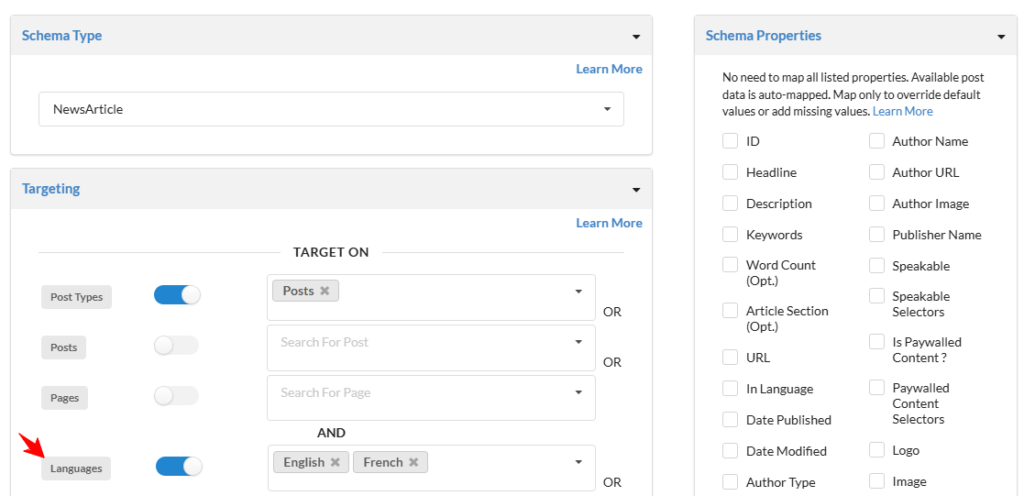
- In the Placement / Display Rules, you will now see an additional option:
- Language Targeting
- Select the language(s) you want this schema to apply to:
- Default language
- Specific TranslatePress languages (e.g., English, French, German, etc.)
- Save the schema
Result
- Schema Package outputs schema only for the selected language
- Each translated page gets its own correct schema markup
- Fully automatic. No per-post editing required
✅ Method 2: Add Schema Manually Per Post (Schema Package Generator)
This method gives you full control per post and per language, perfect for custom or highly optimized schema markup.
How It Works
- Edit any post or page in WordPress
- Open the Schema Package Generator
- Add or edit your schema markup
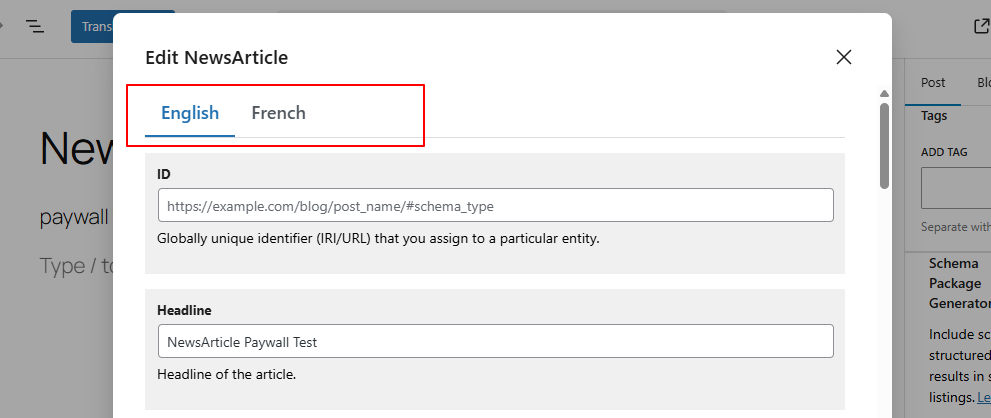
- When TranslatePress is active, you will see:
- Language tabs inside the schema popup
- Switch between language tabs (e.g., EN, FR, DE)
- Enter schema values specific to each language
- Save the schema
Result
- Each language version can have unique schema values
- Schema output matches exactly what users see in that language
🧪 Test Schema Markup (Recommended)
After setting up schema markup for TranslatePress languages, always test the output to ensure the correct language-specific schema is being rendered.
We recommend testing your schema using both tools below:
- Google Rich Results Test
Use this tool to check whether your schema is eligible for Google rich results and verify that the correct schema appears for each translated page URL. - Schema Markup Validator (Schema.org)
Use this tool to validate the schema structure and confirm that language-specific properties follow Schema.org standards.
👉 Make sure to test each TranslatePress language URL separately to confirm only the relevant schema is loaded for the active language.
🔍 Important Notes
- Schema Package automatically detects the current TranslatePress language
- Only the schema assigned to the active language is rendered on the frontend
- If no language-specific schema is found, the default schema may be used (depending on setup)
🚀 Final Thoughts
By combining TranslatePress with Schema Package Premium, you can:
- Generate accurate multilingual schema markup
- Improve international SEO and rich results
- Ensure search engines understand the correct content for each language
Whether you prefer automatic global schema or manual per-post control, Schema Package gives you the flexibility to handle multilingual structured data the right way.